



Close Menu
    What's Hot

    Child mental health forum to be held in Norristown

    May 13, 2024

    GameStop's stock prices surged when Roaring Kitty made a comeback on social media

    May 13, 2024

    Van Jones criticized possible Trump VP candidates for avoiding 2024 election questions, saying it's like failing kindergarten

    May 13, 2024
    Facebook X (Twitter) Instagram Telegram
    Facebook X (Twitter) Instagram
    The Plaza JournalThe Plaza Journal
    Subscribe
    Sunday, February 1
    • Sports
      • American Football
      • Basketball
      • Baseball
      • Boxing
      • Cricket
      • Football
      • Hockey
      • Tennis
    • Politics

      John Dean believes the hush money case against Trump is very strong

      May 13, 2024

      “Cruel and unfeeling” Trump assistant boasts about causing innocent homeless people to be arrested

      May 13, 2024

      Only 5 percent of people mention January 6th as the most important memory from Trump's presidency: Survey

      May 13, 2024

      7 in 10 say they’ve given a lot of thought to election: Gallup

      May 13, 2024

      Trump: ‘Hannibal Lecter is a wonderful man’

      May 13, 2024
    • Technology
    • United States
    • United Kingdom
    • Business
    • Entertainment
    • Science
      1. Archaeology
      2. Anthropology
      3. Space
      4. Biology
      5. Ecology
      6. Geology
      7. Nanotechnology
      8. Neurology
      9. Paleontology
      10. Psychology
      11. Mathematics
      12. Geography
      13. Astrophysics
      14. Oceanography
      15. Physics
      Featured

      How perspiration and endurance helped humans become excellent runners and hunters

      Biology May 13, 20244 Mins Read
      Recent

      How perspiration and endurance helped humans become excellent runners and hunters

      May 13, 2024

      Amazing photos of colorful skies around the world as auroras shine in bright colors

      May 11, 2024

      Scotland has suddenly seen a large increase in mosquitoes

      May 10, 2024
    • Health
    Facebook X (Twitter) Instagram
    The Plaza JournalThe Plaza Journal
    Home»DIY

    How to utilize iPhone Focus modes to avoid interruptions

    By Tyrone JonesMarch 12, 2024 DIY 4 Mins Read
    Share
    Facebook Twitter LinkedIn Pinterest Email

    Setting time spent on smartphone screen establishing limits can be difficult. However, there are more and more apps and tools to assist—including the Focus mode feature built into iOS.

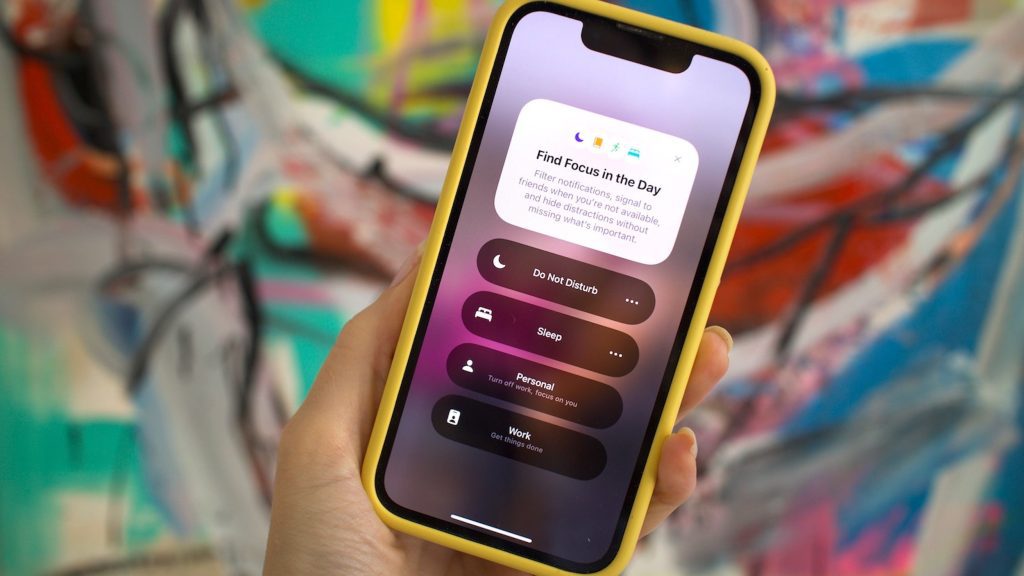
    The concept is that you configure different iPhone Focus modes for various situations: like one for work, one for driving, and one for home possibly. Each mode establishes specific rules about handling notifications and the number of distractions allowed.

    Your iPhone can then switch between these different modes as required, ensuring you stay connected as much as necessary, without missing anything important happening on your smartphone.

    Setting up these Focus modes is simple, can be extensively customized, and has the potential to be more useful than you might expect in reducing the attention you give to your phone.

    Configuring iPhone Focus modes

    Head to Focus from the main iOS Settings menu, and you’ll see some modes already listed, covering standard situations: Driving, Fitness, Sleep, and Work, for example. There’s also the traditional Do Not Disturb mode, which the Focus feature builds on top of—you can simply stick to one of these modes, or use several of them.

    [Related: How your everyday screen time impacts your health]

    Tap on any mode to make adjustments. The two main settings you’ll find cover the contacts who can reach you while the mode is active, and the apps that can still send notifications. Tap Options underneath to change how silenced notifications are managed—they can still prompt notification badges and lock screen alerts, if needed.
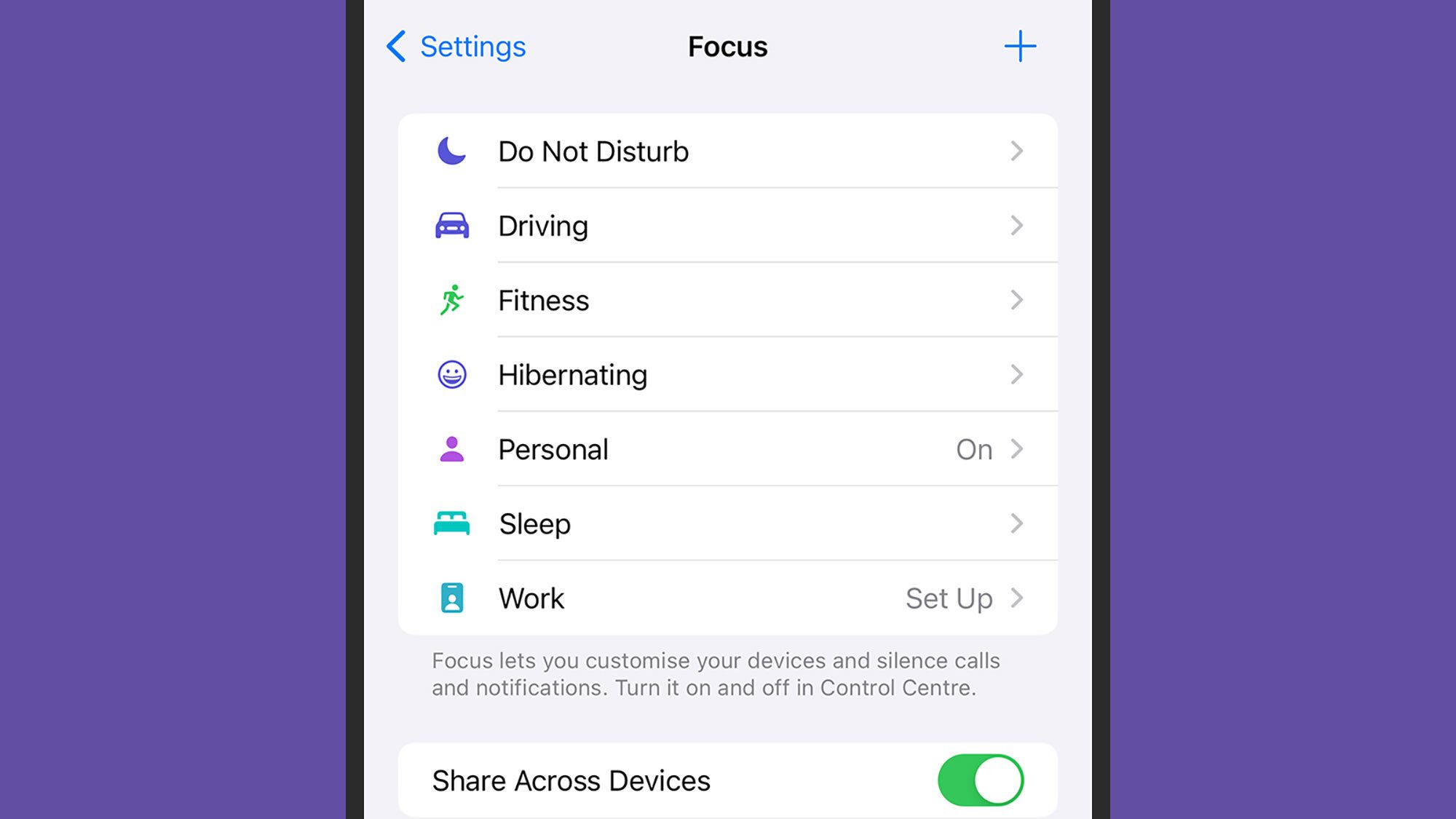
    screenshot of focus options (do not disturb, driving, fitness, hibernating, personal) on an iPhone with purple background
    You’ll find some modes already configured for you. Screenshot: Apple

    There are more settings for the Focus mode further down the page. You can choose specific lock screen and home screen layouts to use when the mode is active, giving you the chance to hide certain apps and shortcuts from view in specific situations (it can also give you an at-a-glance indication of when a mode is active).

    You can also use the Add Schedule option, which allows you to have the Focus mode activate based on a specific time of day, a certain location that your phone’s in (such as the gym), or a certain app you’ve launched. There’s a Smart Activation feature too, where your iPhone will try to intelligently activate the mode automatically when it’s needed, based on “signals like your location, app usage and more”.
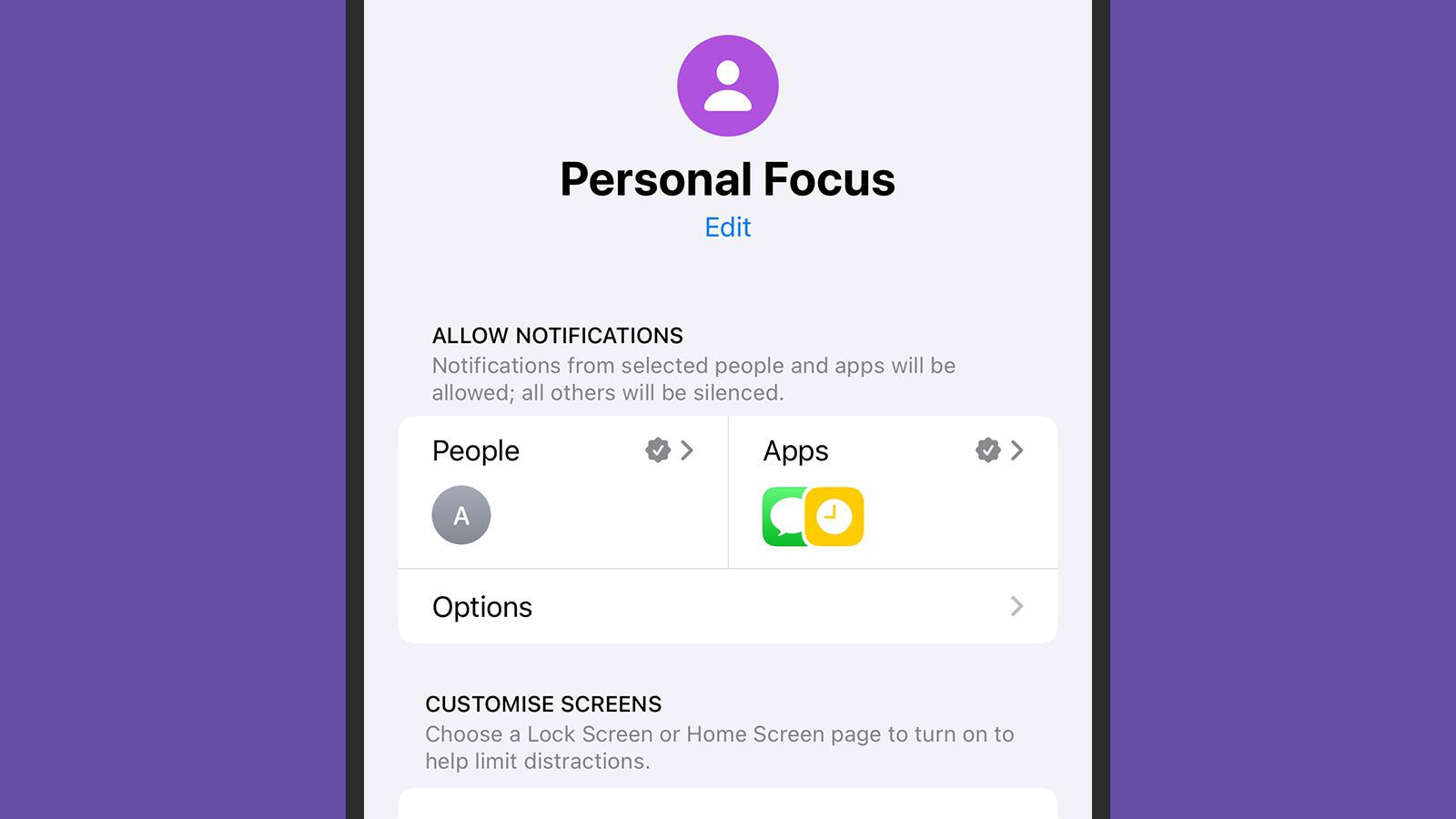
    screenshot of an iphone with "personal focus" on the screen. purple background
    Each mode comes with its own settings linked. Screenshot: Apple

    Finally, use Add Filter to perform other actions on your iPhone when a specific mode is enabled. For example, you can have a particular tab group in Safari appear, or exclude Apple Music activity from your listening history (perhaps you don’t want your sleep playlist affecting your recommendations). You can also activate Dark Mode, Low Power Mode, or Silent Mode along with a specific Focus Mode, if necessary.

    In addition to being scheduled, Focus modes can be activated from Control Center (swipe down from the top right corner of the screen): Tap the Focus modes button, tap on a mode, and it stays active until you turn it off again. You can also set a mode to turn off after a certain time, or when you leave your current location by tapping the three dots next to a Focus mode.

    How to make your own Focus modes

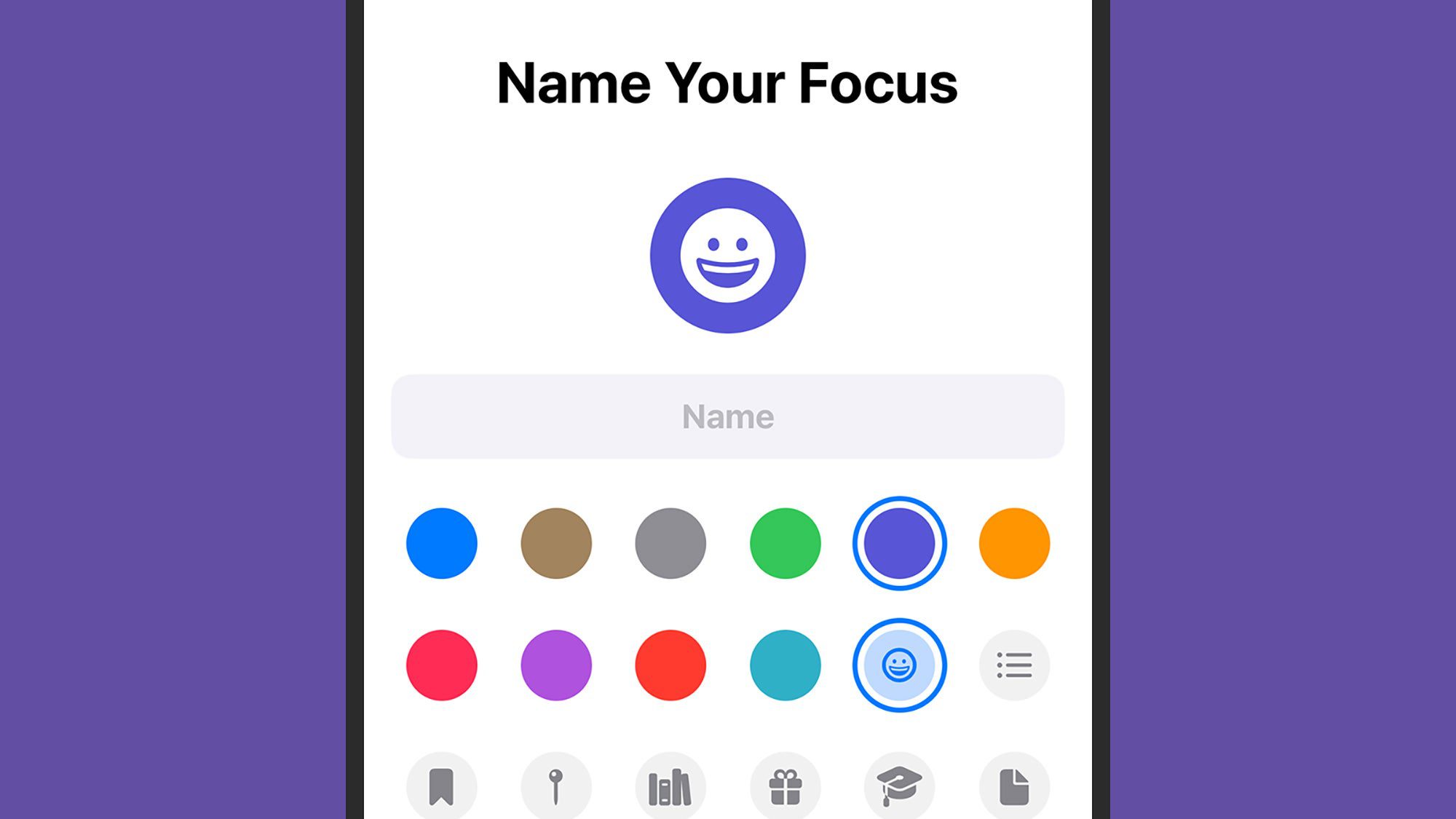
    You don’t need to settle for the Focus modes iOS provides. If you need something different, you can choose Focus from Settings, then tap the + (plus) button in the top right corner. You can select one of the suggestions on screen, or choose Custom to start from scratch. This takes you to a page where you can pick a name, icon, and color for the mode.

    Once that’s done, you'll be taken to the same customization screen as with other Focus modes. You can choose the people and apps whose notifications will be silenced (or unsilenced), select particular lock screens and home screens, and set the mode to turn on automatically, if needed.
    Tech Hacks photo
    Custom modes have their own icon and color. Screenshot: Apple

    When a specific Focus mode is activated, you’ll see its icon in the status bar at the top of the iPhone interface, and its icon and name on the lock screen. If you find that you have too many Focus modes to manage, you can remove them at any time. Choose a mode from the Focus page in Settings, then tap Delete Focus.

    A couple of other options on the Focus page in Settings are worth mentioning: The Share Across Devices toggle switch, which syncs your Focus status across other Apple devices (like iPads and Macs), and the Focus Status option, which shares your current status with your contacts in certain apps (including Messages).


    Tyrone Jones

    Keep Reading

    GameStop's stock prices surged when Roaring Kitty made a comeback on social media

    Chicken fat supercapacitors may be able to store future green energy

    Battle of the AI bots: Copilot vs ChatGPT vs Gemini

    How to distribute iCloud storage

    Add A Comment
    Leave A Reply Cancel Reply

    Must Read
    Latest Posts

    Child mental health forum to be held in Norristown

    May 13, 2024

    GameStop's stock prices surged when Roaring Kitty made a comeback on social media

    May 13, 2024

    Van Jones criticized possible Trump VP candidates for avoiding 2024 election questions, saying it's like failing kindergarten

    May 13, 2024

    Chicken fat supercapacitors may be able to store future green energy

    May 13, 2024

    Most students at prestigious universities believe that there is an issue with antisemitism, as per a survey conducted by U.S. News & World Report

    May 13, 2024
    The Plaza Journal White Logo
    X-twitter Facebook Google Pinterest Telegram

    News

    • World
    • US Politics
    • EU Politics
    • Business
    • Opinions
    • Connections
    • Science

    Company

    • Information
    • Advertising
    • Classified Ads
    • Contact Info
    • Do Not Sell Data
    • GDPR Policy
    • Media Kits

    The Plaza Journal

    • Contact Us
    • Subscription
    • Submit an Anonymous Tip
    • Newsletters
    • Sponsored News
    • Advertise With Us
    • Privacy Notice

    Keep updated

    Get the latest creative news from FooBar about art, design and business.

    Copyright © 2026 The Plaza Journal. All rights reserved.
    • Privacy Policy
    • Terms of Use
    • Cookie Policy
    • Accessibility

    Type above and press Enter to search. Press Esc to cancel.